1. Sample details
2. Sieve set & trial entry
3. Sieve reading (this trial)
Only sieves relevant to the selected size are shown. Pan is included for the mass-balance check only.
Pick one to reopen it here and re-save in place, instead of only being able to delete it below.
| IS Sieve | Wt retained (g) | Cum. wt retained (g) | % retained | Cum. % retained | % passing | IS 383 limit | Status |
|---|---|---|---|---|---|---|---|
| Total | 0.0 | ||||||
Fineness modulus
—
This trial vs IS 383
—
Weight loss on sieving
—
4. Saved gradations — all sizes
Every size you've saved stays visible here, no matter which size is selected above.5. Blend of single-sized stocks
Tick the nominal sizes you're blending and enter each proportion (%). Uses the saved-average gradation of each single-sized stock above. The IS 383 graded limit shown is for the largest nominal size in the blend.
| Nominal size | Proportion (%) | Average gradation on file? |
|---|
Blended gradation curve
Blend
Upper limit
Lower limit
Mid limit
6. Report
This app saves everything (gradations, blends) for the active project in your browser, tied to this folder. Logos and project details are entered once on the main Projects page and shared by every module. If you move the files to a new folder, saved data won't carry over automatically — export a backup first, then import it after moving.
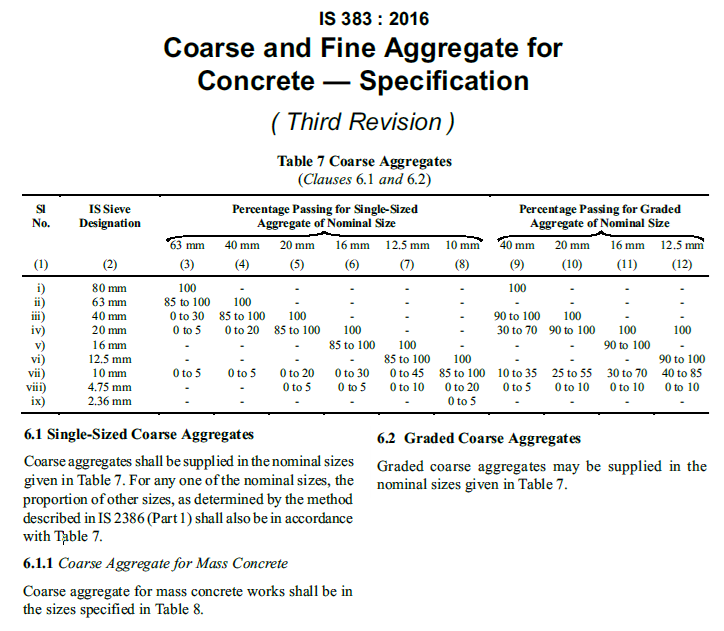
Reference — IS 383:2016, Table 7
Kept here for quick reference while testing. Always verify against your current copy of the standard.